
If you decide to leave the Mpaddi community, you have two options depending on your needs: immediate disconnection or total deletion of your data.
Deactivate your account #
Deactivating your account makes your profile invisible and suspends your access. This is the recommended solution if you simply want to withdraw from public view.
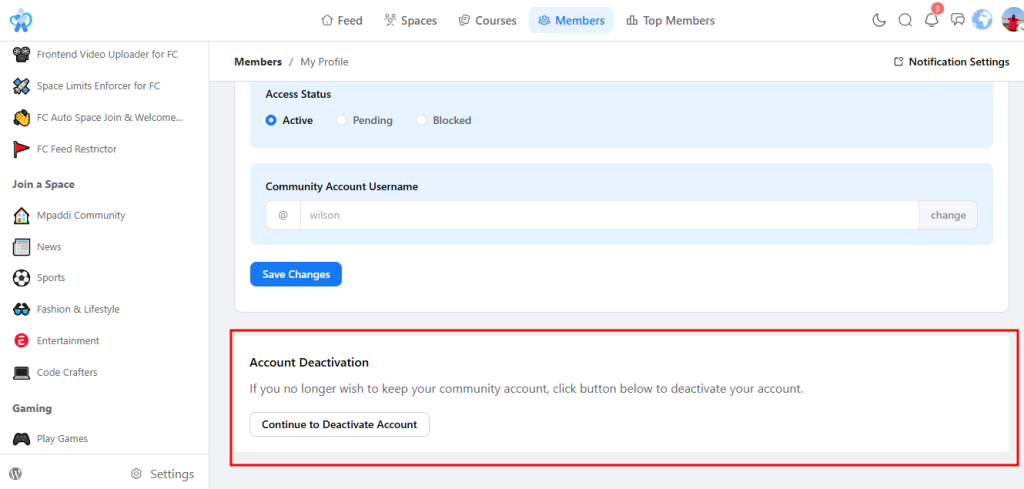
- The procedure: Go to your Profile > Edit profile > Deactivate account (at the bottom of the page).
- What this does: Your profile and content are hidden from other members. You are immediately logged out.
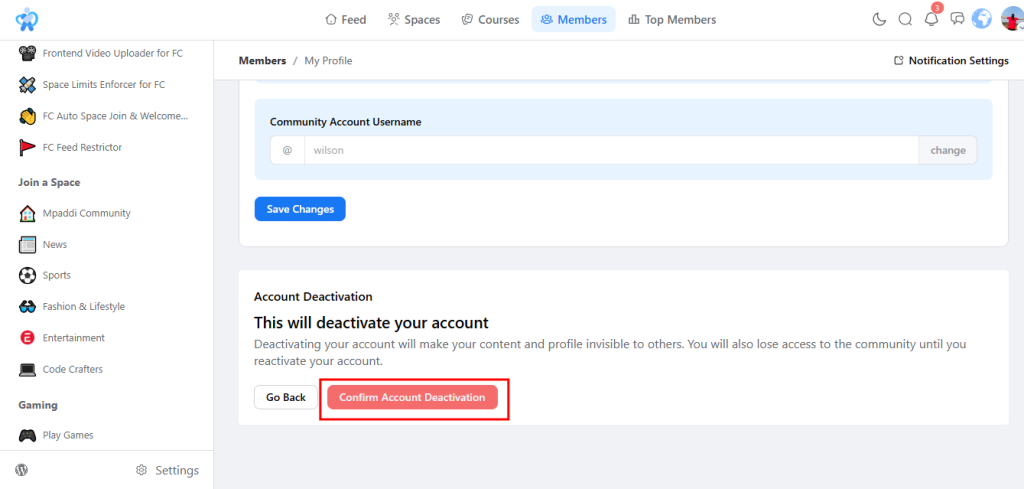
Request confirmation: Before logging out, a final confirmation message summarizes the effects of deactivation on your visibility. To confirm, click the red
“Confirm account deactivation” button . If you change your mind, the “Back” button allows you to cancel the operation.
Reactivate your account #
If your profile is deactivated and you wish to resume your activity on Mpaddi, the procedure is very simple.
- The procedure: Log in to your account with your usual credentials (email and password).
- What’s happening: A message will appear informing you that your community profile is currently deactivated.
- Validation: Click the “Activate my account” button to instantly restore the visibility of your profile and content.
Permanently delete your account #
If you wish Mpaddi to erase all of your personal information irreversibly, you can exercise your “Right to be forgotten” in accordance with the GDPR.
- The procedure: You must open a Support Ticket from your account.
- As a result, this action is final . Once processed, it will be impossible to recover your badges, messages, or history.
- Timeframe: In accordance with the law, we process these requests within 30 days.
Warning about abuse #
Warning: The community is managed by volunteers, and each account incurs technical costs. Out of respect for the team and the site’s resources, we ask that you refrain from repeatedly deactivating or recreating your account. Any abuse may result in permanent account suspension.
Is there a problem that’s driving you to leave? #
Sometimes, the desire to leave a site comes from a bad experience (technical problem, conflict with a member or a disturbing post).
Before making a drastic decision, please don’t hesitate to contact us via the Support Ticket or directly with WiLson Eberechi through private messaging. Most situations can be resolved through dialogue, and we are here to ensure that every member feels comfortable on Mpaddi.