


What's New in Version 4.1.5
Turn FluentCommunity into a powerful video conferencing, meeting, monetization and engagement platform.
💰 Earn More From Every Session
- Get Live Tips — Receive direct support from members during your live calls.
- Monetize Your Expertise — Turn knowledge, advice, and entertainment into earnings.
- Build Your Supporter Base — Recognize and showcase your top contributors.
- Track Your Revenue — Monitor tips, earnings, top tippers, and revenue trends.
- Grow Your Community — Use engagement insights to create better, more valuable sessions.
- Turn Attendance Into Opportunity — Know who joins, participates, and comes back for more.
Connect your community with Jitsi Meet, Zoom, Google Meet, Cisco Webex, and Whereby, allowing members to join live meetings, scheduled sessions, classes, coaching calls, webinars and community events without breaking the flow of your FluentCommunity experience.
Beyond video conferencing, the plugin adds scheduled meetings, live meeting indicators, attendance tracking, meeting analytics, Live Tips, All-Time Tippers, FluentCRM automation, event tracking and more.
Whether you're building an online school, membership community, coaching platform, creator community, professional network or private organization, FluentCommunity Video Calls gives your members a complete place to meet, learn, collaborate and engage.
🚀 The Complete Video Experience for FluentCommunity
Your FluentCommunity website doesn't have to stop at posts, comments and discussions.
With FluentCommunity Video Calls, your community can become a place where members can:
🎥 Meet live
📅 Schedule meetings
🔴 See what's happening live
👥 Track participation
📊 Analyze meeting activity
💰 Receive Live Tips
🏆 Recognize top supporters
⚡ Automate member engagement with FluentCRM
And all of this works directly with your FluentCommunity spaces.
🎥 Multiple Video Providers
Choose the video platform that works best for your community.
Jitsi Meet
Use Jitsi for easy, account-free video conferencing.
Supports:
- Public Jitsi Meet
- Self-hosted Jitsi servers
- Custom Jitsi server URLs
- Embedded meetings
- Custom rooms
- Password-protected rooms
Zoom
Connect Zoom meetings directly to your FluentCommunity spaces.
Supports:
- Zoom meeting creation
- Scheduled meetings
- Zoom Meeting SDK
- Embedded Zoom meetings
- Meeting links
- Zoom meeting indicators
- Attendance tracking
- Meeting analytics
Google Meet
Schedule and connect Google Meet sessions to your community spaces.
Cisco Webex
Create and manage Webex meetings from FluentCommunity.
Whereby
Connect Whereby rooms with FluentCommunity, including embedded meeting support where configured.
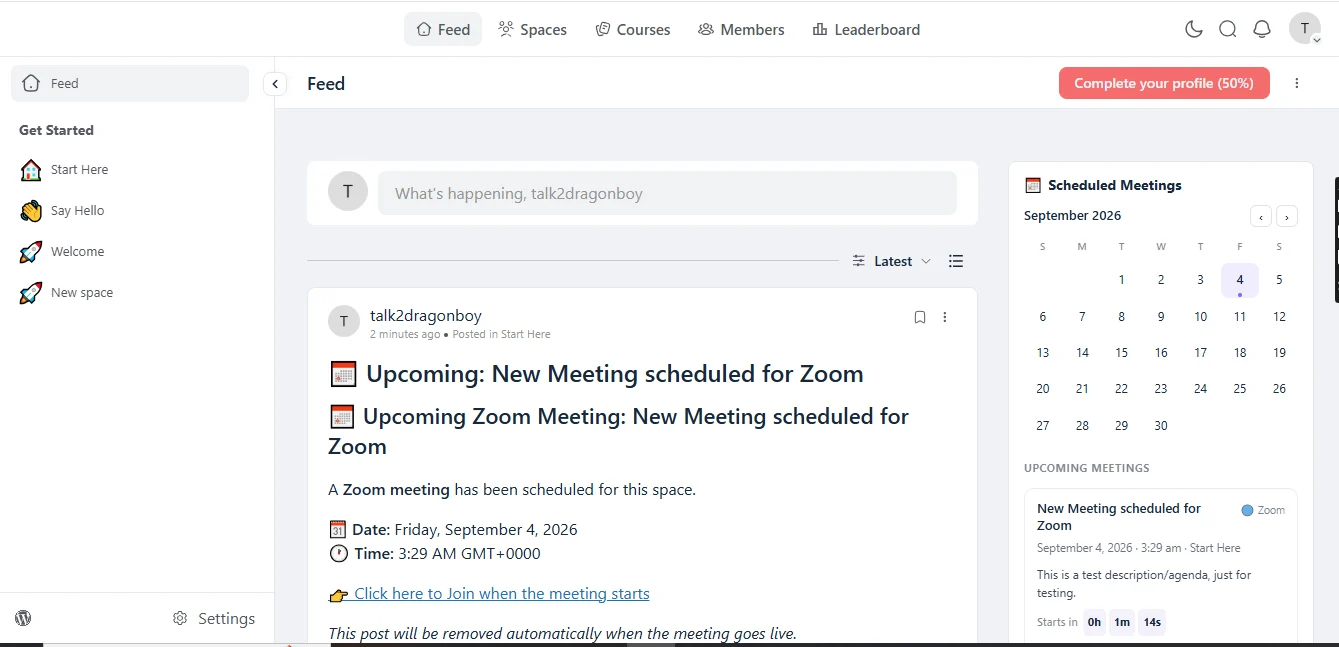
📅 Scheduled Meetings
Never let members miss your next meeting.
The plugin includes a Scheduled Meetings calendar widget that automatically collects upcoming meetings created through:
- Zoom
- Google Meet
- Webex
- Whereby
Once an administrator schedules a meeting for a FluentCommunity space, it can automatically appear in the community's Scheduled Meetings widget.
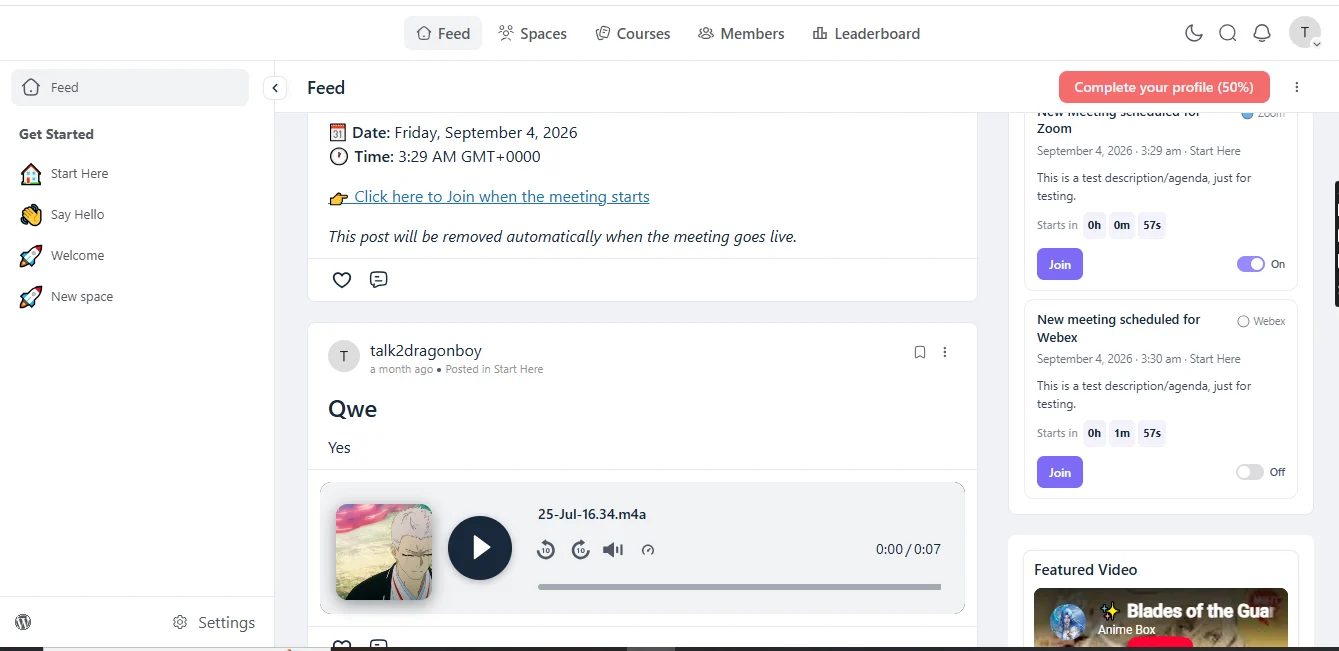
The widget can display:
- Meeting title
- Meeting description/agenda
- Video provider
- Meeting date
- Meeting time
- Countdown
- Join button
- Associated community space
There is no need to manually create another calendar entry.
🗓️ Scheduled Meetings Sidebar Calendar
Give your community a dedicated meeting area directly inside the FluentCommunity portal.
The widget can appear in the right activity sidebar, alongside your community's other sidebar content.
Members can immediately see what's coming up without searching through posts or spaces.
Smart meeting countdown
Members can see how soon a meeting begins with a live countdown.
For example:
Starts in 2 hours 14 minutes
When the meeting becomes active, the experience can transition into the appropriate live/join state.
👨💼 Meeting Visibility Controls
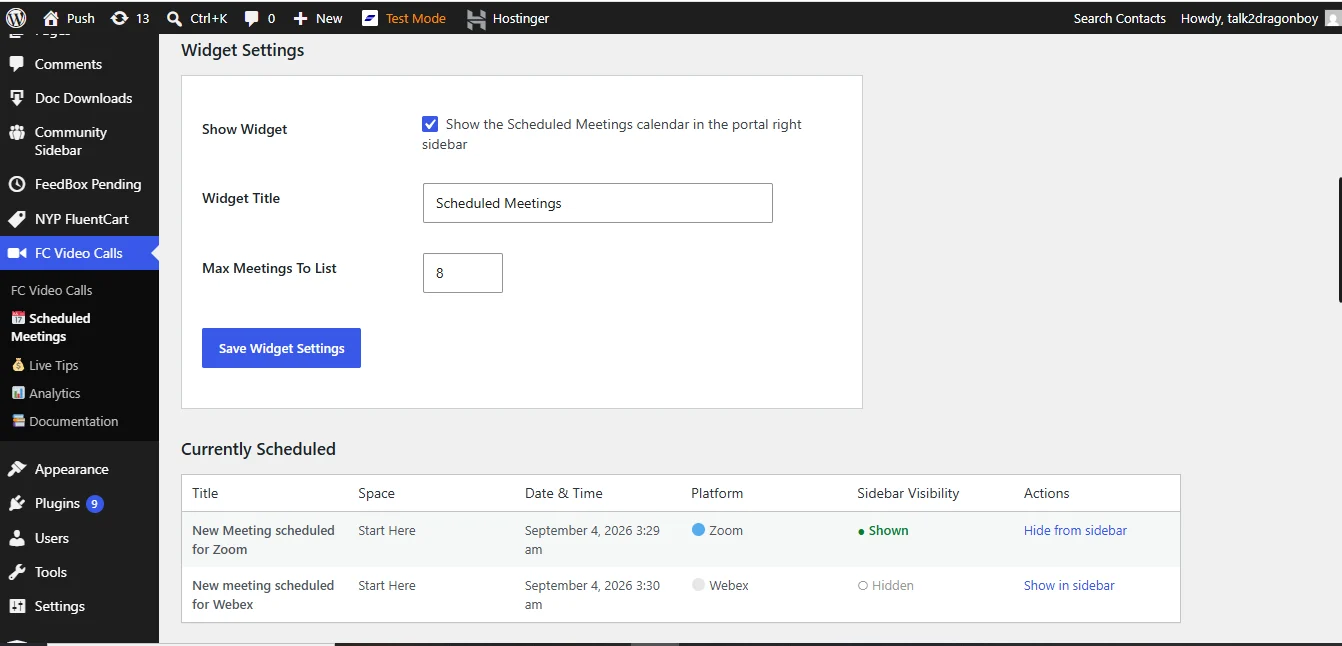
Administrators have control over which scheduled meetings appear in the sidebar.
Each meeting has its own visibility toggle.
Importantly:
Hiding a meeting from the sidebar does NOT cancel the actual meeting.
This allows administrators to keep their meeting schedule clean without deleting or modifying provider-side meetings.
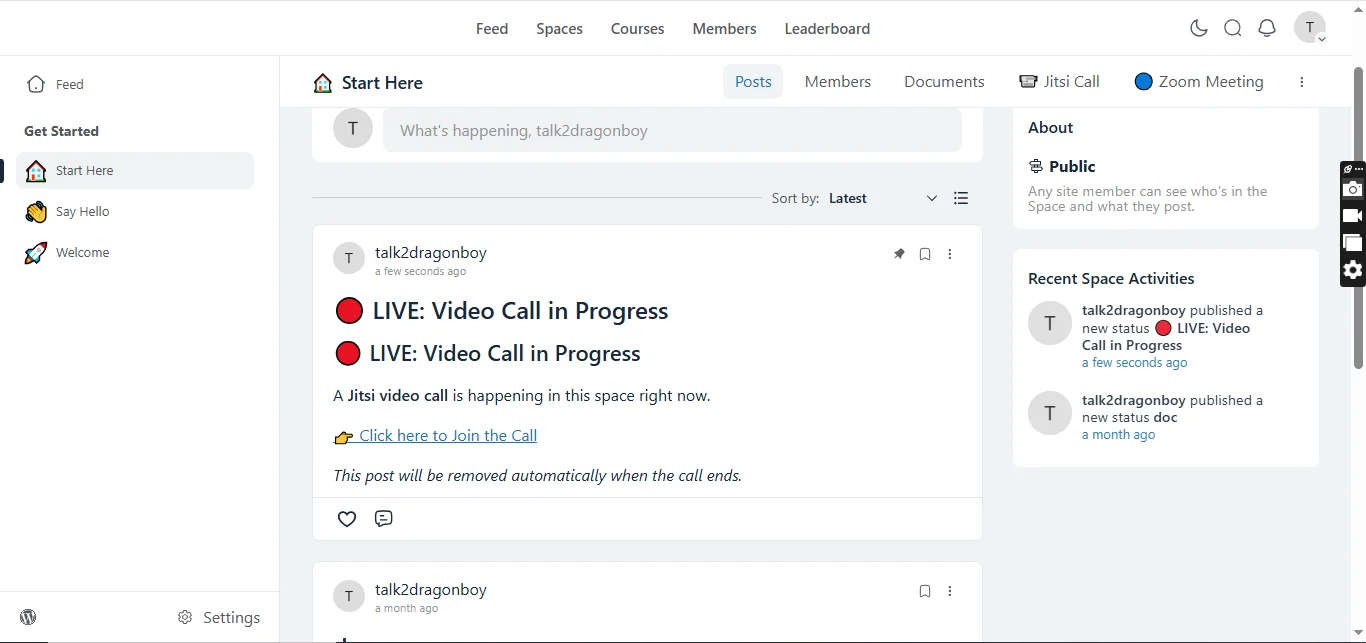
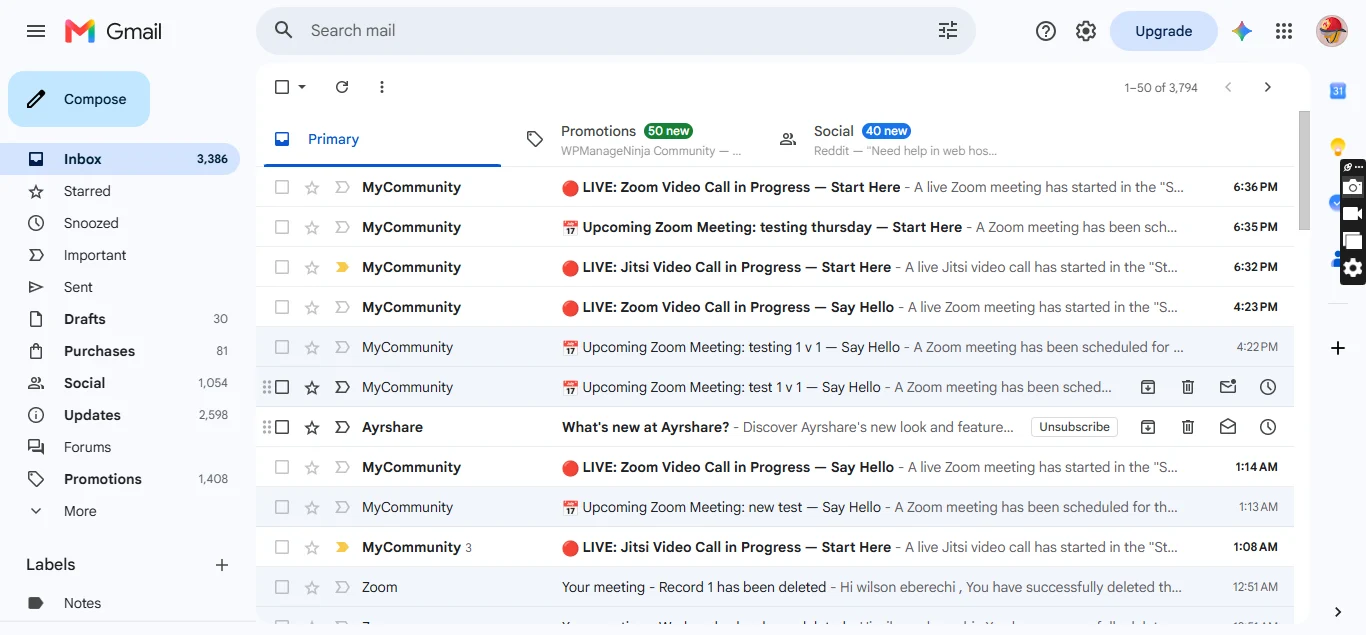
🔴 Live Meeting Indicators
Members shouldn't have to wonder whether a meeting is happening right now.
The plugin provides live indicators for active video sessions.
Depending on the provider and meeting type, community members can see:
🔴 LIVE
alongside active meeting information.
This makes it easier for members to discover and join ongoing sessions.
👥 Participant Tracking
The plugin includes participant monitoring for supported providers.
Track:
- Who joined
- When they joined
- When they left
- How long they participated
- Active participants
- Meeting duration
The plugin uses meeting activity and heartbeat systems to maintain participation information.
📊 Video Meeting Analytics
Turn your meeting activity into useful community insights.
The Video Analytics dashboard provides information such as:
- Total meetings
- Meeting activity
- Participants
- Meeting duration
- Meeting status
- Video provider
- Host information
- Meeting dates
- Attendance records
Administrators can inspect individual meetings and view participant attendance information.
📈 Advanced Analytics
The analytics interface includes:
- Search
- Provider filtering
- Space filtering
- Date filtering
- Pagination
- Meeting tables
- Attendance views
- Provider breakdowns
- Meeting trends
- Top spaces
- Interactive charts
Administrators can analyze how their community actually uses video conferencing.
👤 Attendance Tracking
Know more than simply whether a member clicked "Join."
The plugin can record participant attendance information including:
- Member
- Join time
- Leave time
- Duration
- Host status
- Active participation
This is particularly useful for:
Online schools
Determine who attended a class.
Coaching
Track participation in coaching sessions.
Workshops
Monitor attendance.
Membership communities
Understand member engagement.
🎓 Video Session Completion Tracking
The plugin goes beyond basic attendance.
It can determine whether a participant stayed long enough for the session to count as completed.
The completion system compares:
participant attendance duration
against
total meeting duration
and determines whether the member completed the session based on the configured completion threshold.
This makes video meetings usable as part of learning and engagement workflows.
⚡ FluentCRM Integration
Turn video activity into marketing automation.
FluentCommunity Video Calls includes deep integration with FluentCRM.
Video interactions can become automation triggers and contact activity.
🔥 FluentCRM Automation Triggers
The plugin introduces an FC Video Call automation category containing triggers such as:
💰 Live Tip Payment Successful
Start an automation when a member successfully tips a host during a live call.
👋 Member Joined Video Call
Trigger a workflow when a member joins a supported video meeting.
🚪 Member Left Video Call
Trigger an automation when a member leaves a video session.
✅ Member Completed Video Call
Trigger a workflow when a member watches enough of the session to qualify as completing the call.
🤖 Powerful Automation Possibilities
You can build workflows such as:
Member joins coaching call → Add tag → Send follow-up email
Member completes class → Award achievement → Send certificate/email
Member leaves early → Add partial-attendance tag → Send replay/follow-up
Member tips host → Thank-you automation → Tag contact
Member repeatedly attends meetings → Segment as highly engaged
This turns video conferencing into an actual part of your community's engagement system.
📌 FluentCRM Event Tracking
The plugin can also send important video activity into FluentCRM's Event Tracking system.
Track events such as:
- Live tip activity
- Video participation
- Member joins
- Member leaves
- Completed sessions
- Early departures
- Meeting engagement
This gives administrators a richer view of a member's interaction history.
🏆 All-Time Tippers Leaderboard
Reward the people who support your creators, coaches and hosts the most.
The plugin includes an All-Time Tippers Leaderboard that highlights your biggest supporters.
Features
- Displays top supporters
- Shows the top 7 by default
- Accessible from the call interface
- Beautiful leaderboard modal
- Configurable visibility
- Configurable leaderboard title
- Supports leaderboard reset functionality
This adds a competitive and rewarding element to live community sessions.
💰 Live Tips
Give hosts and creators a way to monetize their live sessions.
Members can send tips to hosts directly from supported video call experiences.
Perfect for:
- Creators
- Coaches
- Teachers
- Consultants
- Mentors
- Community hosts
- Live presenters
A host can run a session while members provide financial support during the experience.
📊 Live Tips Analytics Dashboard
Administrators can monitor tipping activity from a dedicated analytics dashboard.
View:
- Total tips received
- Total host earnings
- Top tippers
- Tipper statistics
- Provider breakdown
- Revenue by provider
- Date and time information
- Space-related tipping activity
📈 Interactive Live Tips Charts
The Live Tips Analytics dashboard includes visual reporting such as:
Pie Charts
Understand the distribution of tipping activity across providers.
Revenue Trend Charts
Track tipping revenue over time.
Top Tippers
Identify your community's biggest supporters.
Provider Analytics
See which video providers are generating tipping activity.
💵 Revenue Insights
Community administrators can analyze:
Who is tipping?
How much are they tipping?
Which hosts receive the most support?
Which spaces generate the most tipping activity?
Which providers generate tipping revenue?
This provides a much clearer picture of your community's monetization performance.
🔔 Live Tip Notifications
Hosts and community members can receive feedback when tips are successfully processed.
The plugin can also provide live tip activity and notification experiences during sessions.
💬 Community Engagement
Live meetings don't have to exist separately from your community.
The plugin is designed around FluentCommunity spaces, allowing video sessions to become part of your existing community ecosystem.
Members can discover meetings through their spaces, join sessions and continue engaging with the community afterward.
🔐 Space-Based Access
Video functionality can be configured around individual FluentCommunity spaces.
This means you can create different experiences for different communities.
For example:
Free Community
→ Public discussions
Premium Community
→ Private video meetings
Coaching Space
→ Scheduled coaching calls
Course Space
→ Live classes
VIP Space
→ Exclusive meetings
⚙️ Per-Space Video Settings
Administrators can configure video functionality independently for spaces.
Depending on provider and configuration, settings can include:
- Enable/disable video calls
- Meeting rooms
- Room names
- Password protection
- Provider configuration
- Scheduled meetings
- Meeting access
🖥️ Embedded Video Experience
Supported providers can be displayed through your website's own meeting pages.
This creates a more integrated experience instead of simply sending users away from your community.
Depending on provider configuration, users can experience meetings through dedicated pages such as:
- Video Call
- Zoom Meeting
- Whereby Meeting
🌐 Self-Hosted Jitsi Support
For organizations that want greater control, Jitsi can be configured to use your own Jitsi infrastructure.
Instead of relying exclusively on the public Jitsi service, you can connect the plugin to a custom Jitsi server.
Ideal for organizations concerned with:
- Privacy
- Infrastructure control
- Data ownership
- Custom deployments
- Large communities
image
image
For those who already have the add-on, kindly update directly from your wordpress plugin, and if you're yet to purchase this add-on, below is the link.
👇👇Grab yours now
https://www.youtube.com/watch?v=94rmOtfsMq8
https://m.youtube.com/watch?v=nZolSvG4TYE
https://www.youtube.com/watch?v=jA-YaSh92SY
🎯 Perfect For
🎓 Online Education
👨🏫 Coaching
Create private coaching spaces with scheduled meetings and attendance tracking.
💼 Professional Communities
🎙️ Creator Communities
💎 Membership Websites
⭐ Why FluentCommunity Video Calls?
Most video conferencing plugins simply put a meeting link somewhere on your WordPress website.
FluentCommunity Video Calls goes much further.
It connects video conferencing with your:
Community + Spaces + Meetings + Attendance + Analytics + Monetization + CRM Automation
That means video becomes an actual part of your community platform rather than an isolated external service.
...
What's New in Version 4.1.0
https://www.youtube.com/watch?v=94rmOtfsMq8
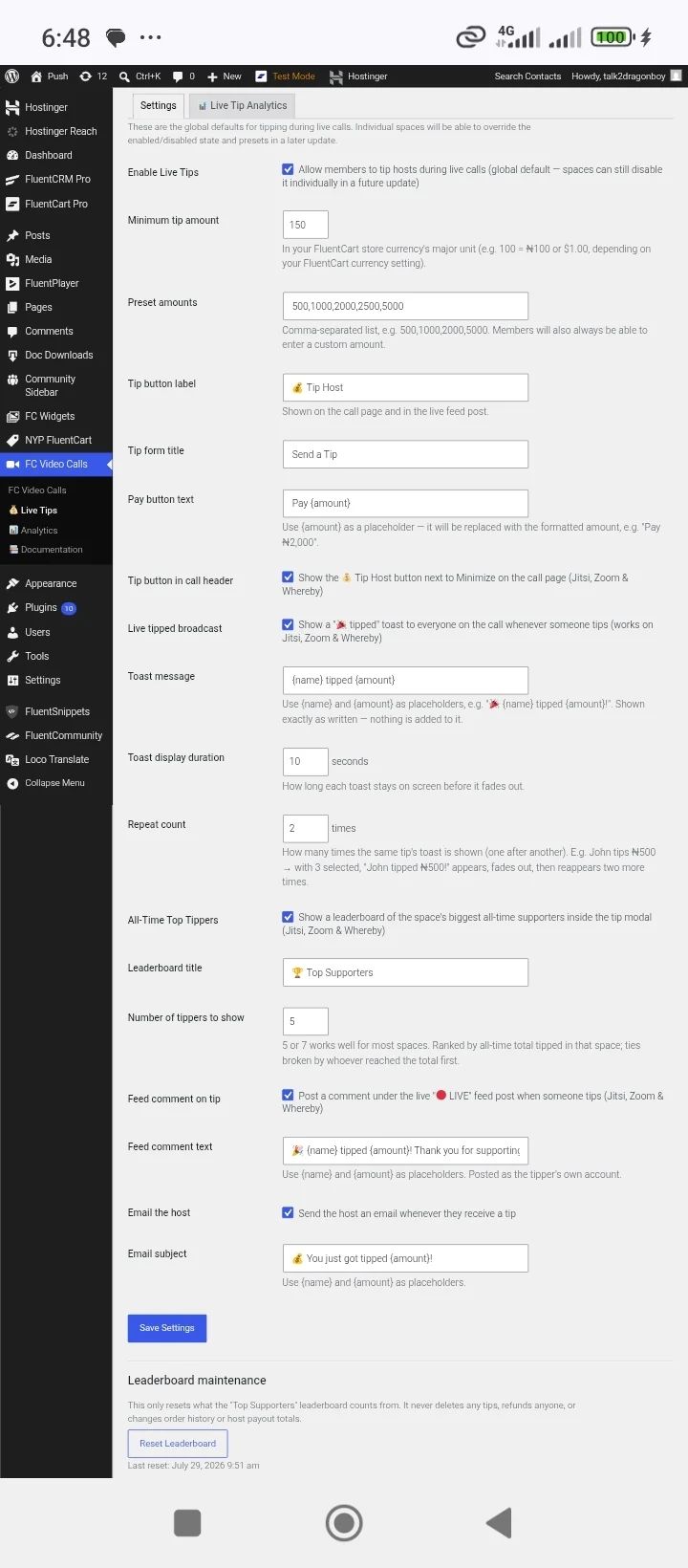
🏆 All-Time Tippers Leaderboard
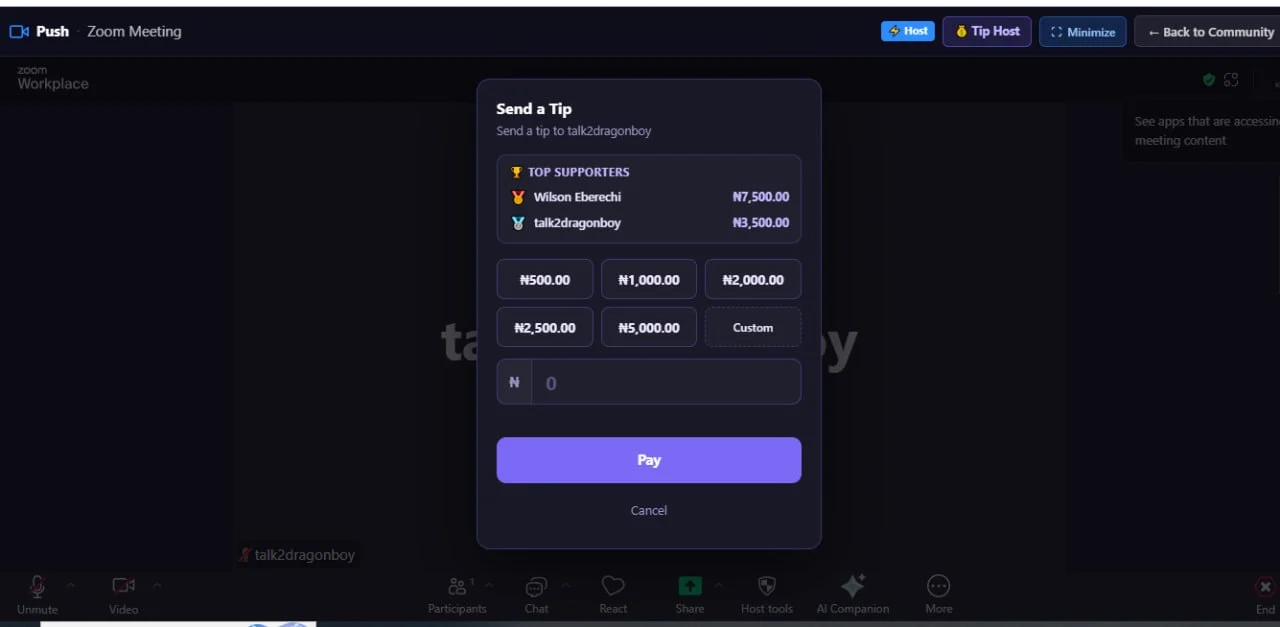
Recognize and celebrate your community's biggest supporters with the new All-Time Tippers Leaderboard.
- Displays the Top 7 All-Time Tippers in a beautiful modal popup.
- Accessible directly from the Call Page header.
- Community administrators can enable or disable the leaderboard with a simple toggle.
- Encourages community engagement and rewards your most generous supporters.
.
.
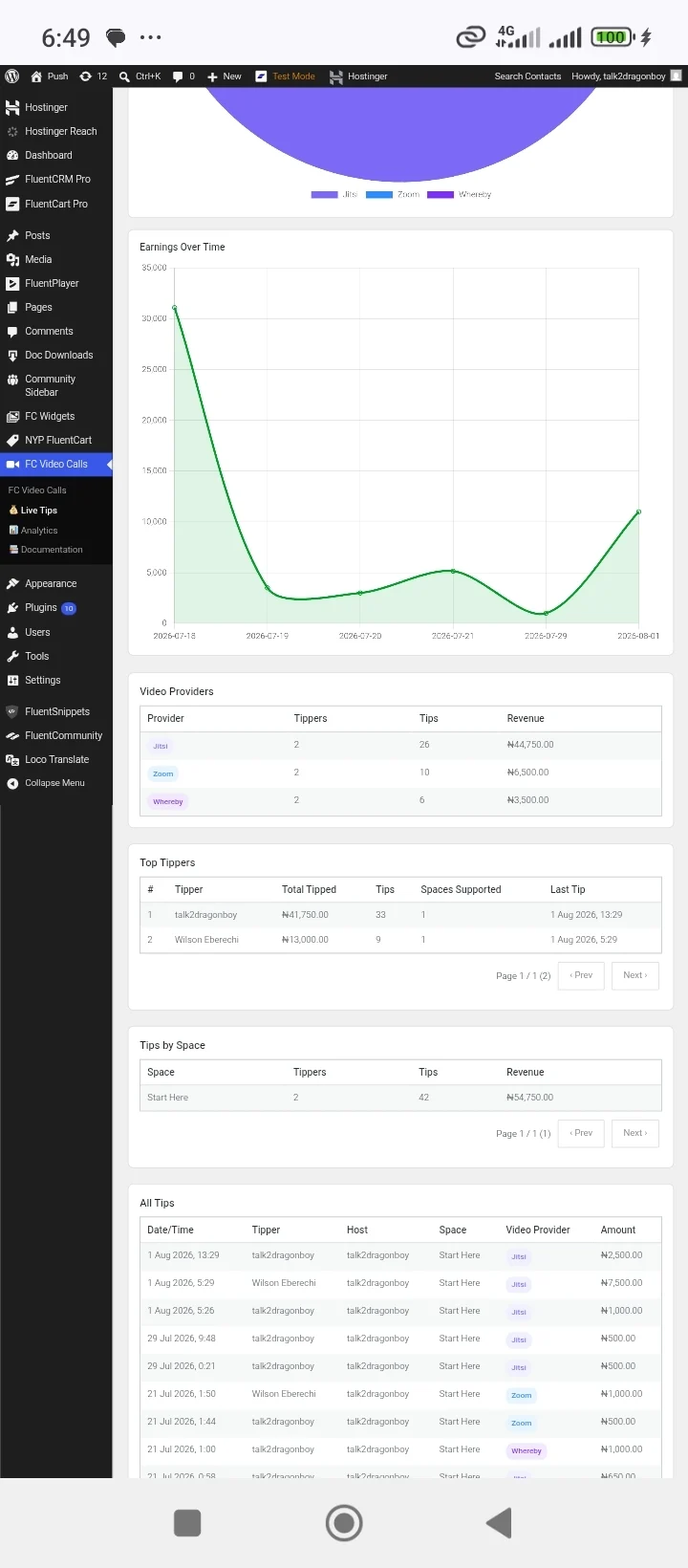
📊 Live Tips Analytics Dashboard
Gain valuable insights into your community's tipping activity with the new Live Tips Analytics page, available under the Live Tips menu.
Features include:
- Top Tippers leaderboard
- Total Tips Received
- Total Host Earnings
- Revenue breakdown by video provider
- Tipper statistics for each provider
- Interactive Pie Charts
- Revenue Trend Line Charts
- Date & Time tracking
- Advanced Search
- Filters
- Pagination
- Comprehensive reporting and analytics
.
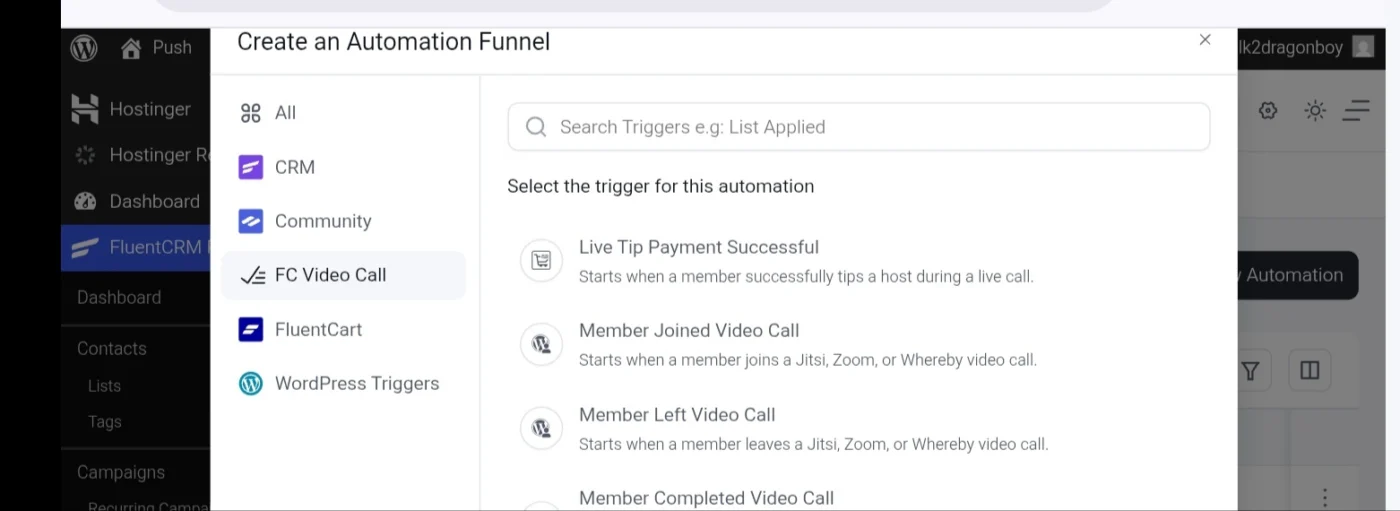
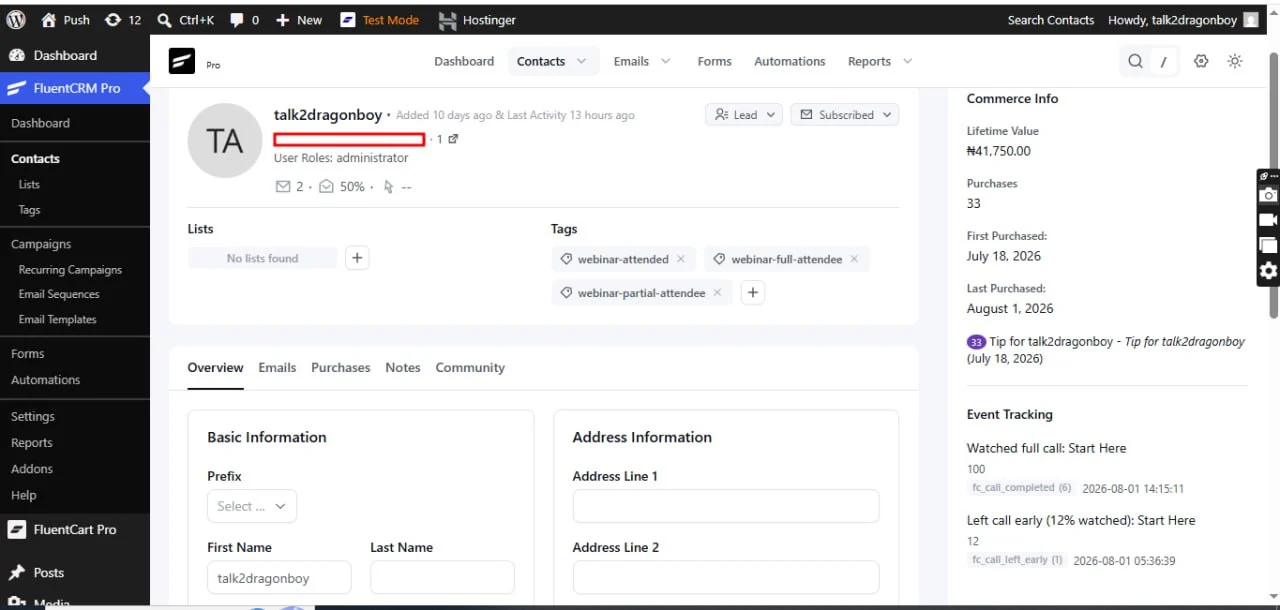
⚡ FluentCRM Automation & Event Tracking
Take your community automation to the next level with deeper FluentCRM integration, including new automation triggers and event tracking.
New Automation Triggers
- Live Tip Received – Trigger automations whenever a member sends a live tip to a host.
- Member Joined Video Call – Trigger workflows when a member joins a video meeting.
- Member Left Video Call – Trigger workflows when a participant leaves a meeting.
- Member Completed Video Call – Trigger actions after a member successfully completes a video session.
.
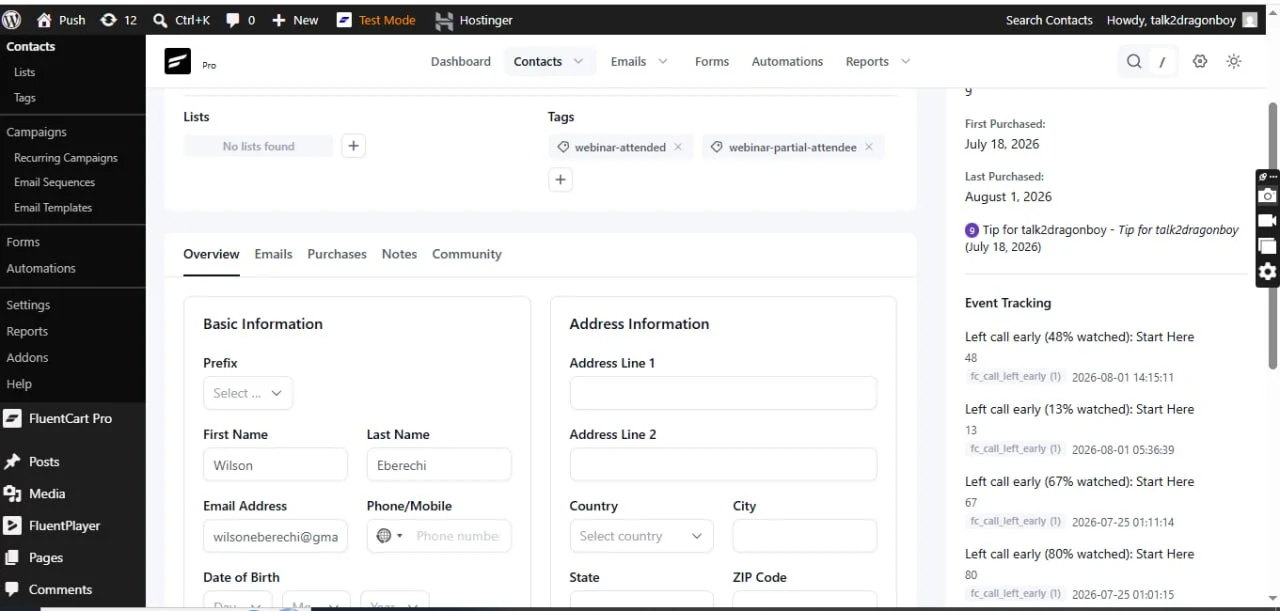
New Event Tracking
Automatically track important video call activities inside FluentCRM, including:
- Live tip events
- Video call participation
- Member join and leave activity
- Completed video sessions
- Meeting engagement history
- Contact timeline events for better audience insights and segmentation
Build powerful automations such as follow-up emails, targeted campaigns, contact tagging, achievements, onboarding sequences, and personalized engagement based on members' video activity and live tipping behavior.
.
.
https://www.youtube.com/watch?v=nZolSvG4TYE
👇👇Grab yours now
Jitsi • Zoom • Google Meet • Webex • Whereby • Live Tips • Analytics
✨ New: Hosts can earn money during live sessions with the built-in Live Tips feature, allowing members to send instant tips and donations while meetings are in progress.
Perfect for coaches, creators, educators, consultants, and community owners who want to host meetings and monetize live events—all without leaving their community.
Bring meetings, classes, coaching sessions, webinars, and real-time collaboration directly into your FluentCommunity-powered website.
FluentCommunity Video Calls is a powerful video conferencing add-on built exclusively for FluentCommunity. It enables community members to create, schedule, join, and manage live meetings without leaving your website.
With support for Jitsi Meet, Zoom, Google Meet, Cisco Webex, and Whereby, you can choose the provider that best fits your community while keeping every meeting connected to your FluentCommunity Spaces.
Beyond video conferencing, the plugin introduces live tipping, attendance tracking, meeting analytics, provider scheduling, live meeting indicators, embedded meeting pages, and advanced space-level controls, making it one of the most complete communication solutions available for FluentCommunity.
About The Plugin
FluentCommunity Video Calls transforms every FluentCommunity Space into a modern collaboration hub.
Whether you're running a membership website, online school, coaching platform, private community, remote team, or customer portal, members can communicate through live video meetings without being redirected to external websites.
Administrators can decide which provider each Space uses, configure permissions, schedule meetings, monitor participation, and even allow members to financially support hosts during live sessions through integrated tipping.
Everything stays organized inside FluentCommunity, creating a seamless community experience.
What's New
This release introduces major upgrades that significantly expand the plugin beyond traditional video meetings.
New Multi-Provider Support
Choose from multiple meeting providers:
- Jitsi Meet
- Zoom
- Google Meet
- Cisco Webex
- Whereby
Each provider includes its own scheduling tools, meeting indicators, and provider-specific integrations.
Live Tips & Creator Support
Members can financially support meeting hosts while sessions are live(Only for Jitsi, Zoom & Whereby).
Perfect for:
- Coaches
- Trainers
- Teachers
- Content creators
- Mentors
- Guest speakers
- Community events
Features include:
- Live tipping
- Real-time notifications
- Tip history
- Meeting tip records
- Host earnings support
- Fluentcart is needed for Live Tip
Google Meet Integration
Create and manage Google Meet sessions directly inside FluentCommunity.
Includes:
- Scheduled meetings
- Meeting links
- Calendar-ready scheduling
- Live indicators
- Space integration
Cisco Webex Integration
Host professional meetings with Webex.
Supports:
- Scheduled meetings
- Meeting management
- Space integration
- Live meeting status
Whereby Integration
Simple browser-based meetings with Whereby.
Features include:
- Embedded rooms
- Scheduled sessions
- Live indicators
- Easy member access
Core Features
Multiple Video Providers
Unlike traditional meeting plugins, you are not locked into a single provider.
Supported platforms include:
- Jitsi Meet
- Zoom
- Google Meet
- Cisco Webex
- Whereby
Each Space can be configured independently.
Native FluentCommunity Experience
Members never have to search through emails for meeting links.
Everything lives inside your community:
- Meeting pages
- Space announcements
- Live badges
- Join buttons
- Meeting history
- Activity updates
One-Click Meeting Creation
Create meetings directly from FluentCommunity.
Perfect for:
- Community discussions
- Live classes
- Weekly meetings
- Team collaboration
- Workshops
- Office hours
Meeting Scheduling
Schedule meetings in advance with supported providers.
Members instantly know:
- Date
- Time
- Provider
- Meeting status
- Join availability
Live Meeting Indicators
Community members immediately see when a Space is active.
Displays include:
- LIVE badge
- Scheduled meeting badge
- Active meeting status
- Join now button
Attendance Tracking
Automatically monitor meeting participation.
Track:
- Join time
- Attendance
- Active participation
- Meeting history
Embedded Video Experience
Meetings can open:
- Embedded inside FluentCommunity
- Dedicated meeting pages
- Full-screen mode
- New browser tab
Per-Space Controls
Every Space can have its own configuration.
Administrators can:
- Enable or disable meetings
- Select meeting provider
- Configure room settings
- Restrict permissions
- Customize meeting behavior
Provider Scheduling
Schedule meetings for:
- Zoom
- Google Meet
- Webex
- Whereby
Keep members informed without leaving FluentCommunity.
Automatic Meeting Rooms
Automatically generate unique rooms based on your Space identity.
Benefits include:
- No room conflicts
- Cleaner organization
- Better privacy
- Consistent meeting links
Custom Room Names
Create memorable meeting rooms.
Supports:
- Custom names
- Private rooms
- Protected rooms
- Organization branding
Live Notifications
Keep members informed with automatic updates.
Notifications include:
- Meeting scheduled
- Meeting starting
- Live session alerts
- Provider updates
- Community announcements
Meeting Analytics
Understand how your community uses live meetings.
View:
- Meeting activity
- Attendance statistics
- Provider usage
- Active Spaces
- Community engagement
REST API
Developer-friendly REST endpoints make it easy to extend the plugin.
Includes APIs for:
- Meeting status
- Room information
- Heartbeats
- Active sessions
- Provider data
Role-Based Permissions
Control access using FluentCommunity roles.
Support for:
- Administrators
- Moderators
- Space managers
- Members
Self-Hosted Ready
Choose the deployment that matches your infrastructure.
Supports:
- Public Jitsi
- Self-hosted Jitsi
- 8x8 JaaS
- Cloud providers
Benefits
Keep Members Engaged
Instead of sending users across multiple services, every meeting stays connected to your community.
Support Multiple Meeting Platforms
Different organizations use different providers.
This plugin lets you choose the right platform without changing your community workflow.
Monetize Live Events
Allow community members to support hosts through live tips.
Perfect for:
- Paid communities
- Coaches
- Educators
- Creators
- Mentors
Improve Community Engagement
Real-time conversations increase:
- Member retention
- Participation
- Learning outcomes
- Community activity
Built for Learning Platforms
Excellent for:
- Online schools
- Membership sites
- Training organizations
- Coaching businesses
- Study groups
Enterprise Ready
Use enterprise-grade providers like:
- Zoom
- Webex
- Google Meet
or choose the flexibility of:
- Jitsi
- Whereby
Flexible Deployment
Run meetings using free public services or your own infrastructure for complete control over branding, privacy, and performance.
Perfect For
- Online Communities
- Membership Websites
- Coaching Businesses
- Learning Management Systems
- Universities
- Schools
- Study Groups
- Corporate Teams
- Customer Communities
- Internal Collaboration
- Webinars
- Live Workshops
- Community Events
- Support Communities
- Creator Communities
Requirements
- WordPress 6.0+
- PHP 7.4+
- FluentCommunity
- At least one configured meeting provider
Changelog
Version 4.0.0
New
- Added Google Meet integration
- Added Cisco Webex integration
- Added Whereby integration
- Added live tipping system for meeting hosts
- Added meeting tip notifications
- Added tip recording and history
- Added provider-specific schedulers
- Added Google Meet scheduled meeting indicators
- Added Webex scheduled meeting indicators
- Added Whereby scheduled meeting indicators
- Added Whereby live meeting indicator
- Expanded provider management framework
- Improved meeting analytics
- Enhanced REST API support
- Improved permission handling
- Better room management utilities
- Improved meeting status tracking
Improved
- Faster provider loading
- Better meeting scheduling workflow
- Improved Space integration
- Better meeting management
- Enhanced administrator controls
- Improved user experience
- Optimized performance
- Cleaner provider architecture
Fixed
- Various UI improvements
- General stability improvements
- Improved compatibility with newer FluentCommunity versions
- Minor bug fixes and code optimizations
🎉 Launch Offer: Get it for just $50 Lifetime Deal(unlimited years, unlimited sites, 5 years full support and updates), if you're among the first 10 buyers. After that, the price increases.
https://www.youtube.com/watch?v=nZolSvG4TYE
👇👇Grab yours now
Don't miss your chance to be one of the first 10!
https://www.youtube.com/watch?v=jA-YaSh92SY
Image 1:
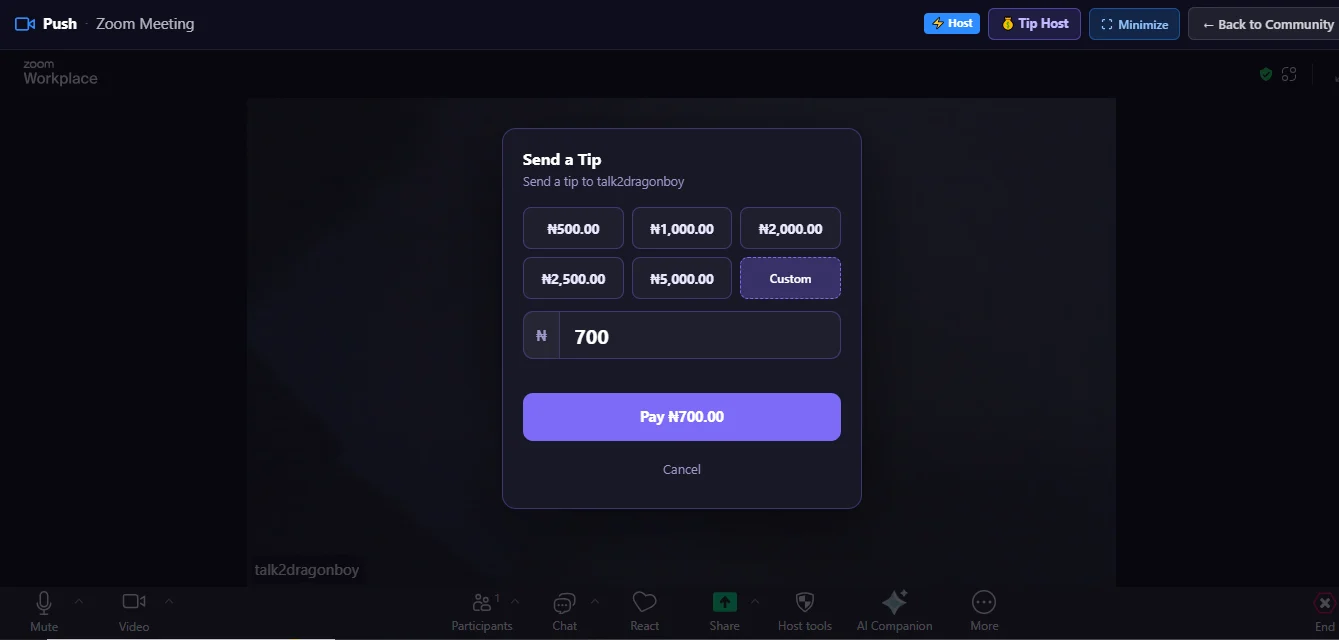
Image 2:
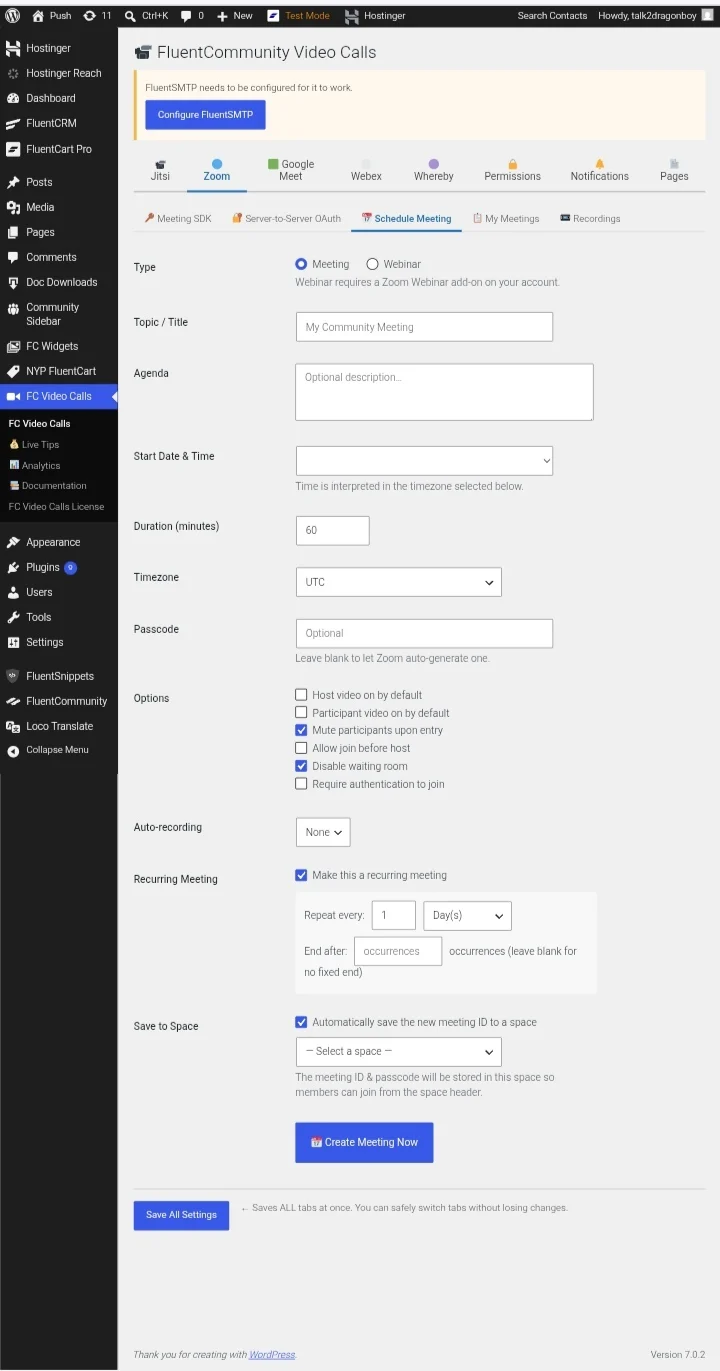
Image 3:
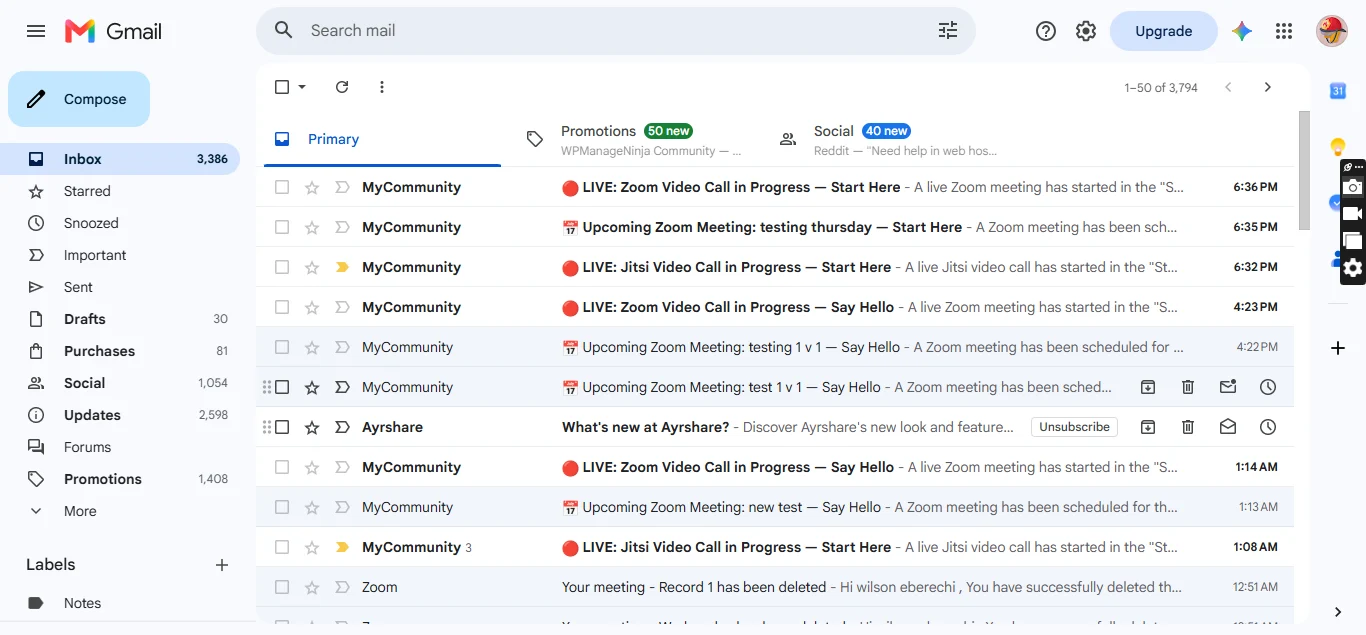
Image 4:
Why Choose FluentCommunity Video Calls ?
Unlike generic video plugins, FluentCommunity Video Calls is designed specifically for FluentCommunity.
It combines multiple conferencing providers, intelligent scheduling, embedded meeting experiences, attendance tracking, analytics, and creator monetization into a single solution that feels like a native part of your community.
Whether you're hosting a classroom, coaching session, private mastermind, company meeting, or community event, everything happens where your members already are—inside FluentCommunity.
FluentCommunity Video Calls (Jitsi + Zoom) transforms your FluentCommunity-powered community into a complete video collaboration platform.
The plugin adds built-in video conferencing directly inside FluentCommunity Spaces, allowing community members to start and join live video calls without leaving your website.
Powered by Jitsi Meet and Zoom integration, it provides a seamless way to host community meetings, online classes, group discussions, coaching sessions, webinars, and private space conversations.
No extra accounts are required for Jitsi. No complicated setup. Just enable video calls inside your FluentCommunity spaces and start connecting.
About The Plugin
FluentCommunity Video Calls is designed for communities, membership sites, online schools, coaching platforms, and organizations using FluentCommunity.
Instead of sending users to external platforms, this plugin keeps your members engaged inside your own WordPress community.
Each FluentCommunity space can have its own dedicated video room, with controls for administrators and moderators.
Whether you are running:
- Online communities
- Membership platforms
- Learning communities
- Coaching groups
- Team collaboration spaces
- Private discussion groups
this plugin adds real-time communication directly into your platform.
Key Features
🎥 Built-in Video Calls Inside FluentCommunity
Add video conferencing directly into FluentCommunity spaces.
Members can:
- Join live calls
- Communicate through video and audio
- Share screens
- Chat during meetings
- Collaborate in real time
Jitsi Meet Integration
Uses Jitsi Meet technology for free video conferencing.
Features:
- No Jitsi account required
- No API key required
- No external registration
- Works with public Jitsi servers
- Supports self-hosted Jitsi servers
- Supports 8x8 JaaS JWT authentication
Zoom Integration
Connect your FluentCommunity spaces with Zoom meetings.
Includes support for:
- Zoom meeting creation
- Scheduled meetings
- Zoom meeting indicators
- Zoom recording handling
- Zoom API integration framework
Per-Space Video Call Controls
Each FluentCommunity space can have independent settings.
Admins can:
- Enable/disable video calls per space
- Create dedicated rooms
- Configure meeting behavior
- Control availability
Automatic Meeting Room Creation
The plugin automatically generates unique video rooms based on:
- Website URL
- FluentCommunity space slug
- Space identity
This prevents room conflicts and keeps every community space separated.
Custom Room Names
Administrators can customize meeting rooms.
Options include:
- Custom room names
- Private rooms
- Password-protected meetings
Full Screen Embedded Video Experience
Members can join calls directly inside your community.
Supports:
- Embedded video call pages
- Full-screen experience
- New tab mode
Live Call Indicator
Community members can instantly see when a space is active.
Includes:
- LIVE badge
- Active meeting status
- Real-time call indicators
Real-Time Participant Tracking
Tracks active users inside meetings using:
- REST heartbeat system
- Browser BroadcastChannel communication
- Live room activity monitoring
Attendance Tracking
Built-in attendance monitoring.
Track:
- Participants
- Join activity
- Meeting attendance
- Participation data
Analytics Dashboard
Includes analytics tools for monitoring video activity.
Administrators can view:
- Meeting activity
- Attendance information
- Usage statistics
Role-Based Permissions
Control who can access video features.
Supports:
- Administrators
- Moderators
- Space managers
- Community members
Email Notifications
Supports community communication features including:
- Meeting notifications
- Space call alerts
- Member communication workflows
REST API Support
Includes custom endpoints for:
- Room information
- Active rooms
- Meeting heartbeat tracking
- Call status monitoring
Self-Hosted Friendly
Designed for flexibility.
You can use:
- Public Jitsi Meet
- Your own Jitsi server
- 8x8 JaaS infrastructure
Giving you control over privacy, performance, and scaling.
Benefits
Keep Users Inside Your Community
No more sending members to:
- Zoom links
- Google Meet
- External platforms
Everything happens inside your FluentCommunity website.
Increase Community Engagement
Live video creates stronger communities through:
- Real conversations
- Group interaction
- Live events
- Better member retention
Perfect For Online Learning
Ideal for:
- Courses
- Workshops
- Training groups
- Study communities
- Coaching programs
Reduce Platform Costs
Using Jitsi means:
- No expensive video subscriptions
- No required accounts
- No per-user licensing fees
Better Privacy Control
With self-hosted Jitsi support, you can control:
- Data location
- Infrastructure
- Security
- Branding
Use Cases
Online Communities
Create live discussion rooms inside your spaces.
Membership Websites
Give premium members private video rooms.
Online Schools
Host classes and live lessons.
Coaching Platforms
Run private coaching calls.
Remote Teams
Create internal collaboration spaces.
Events & Webinars
Host live community events.
Requirements
- WordPress 6.0+
- PHP 7.4+
- FluentCommunity installed
- Jitsi Meet or Zoom configuration
https://www.youtube.com/watch?v=jA-YaSh92SY
image 1:
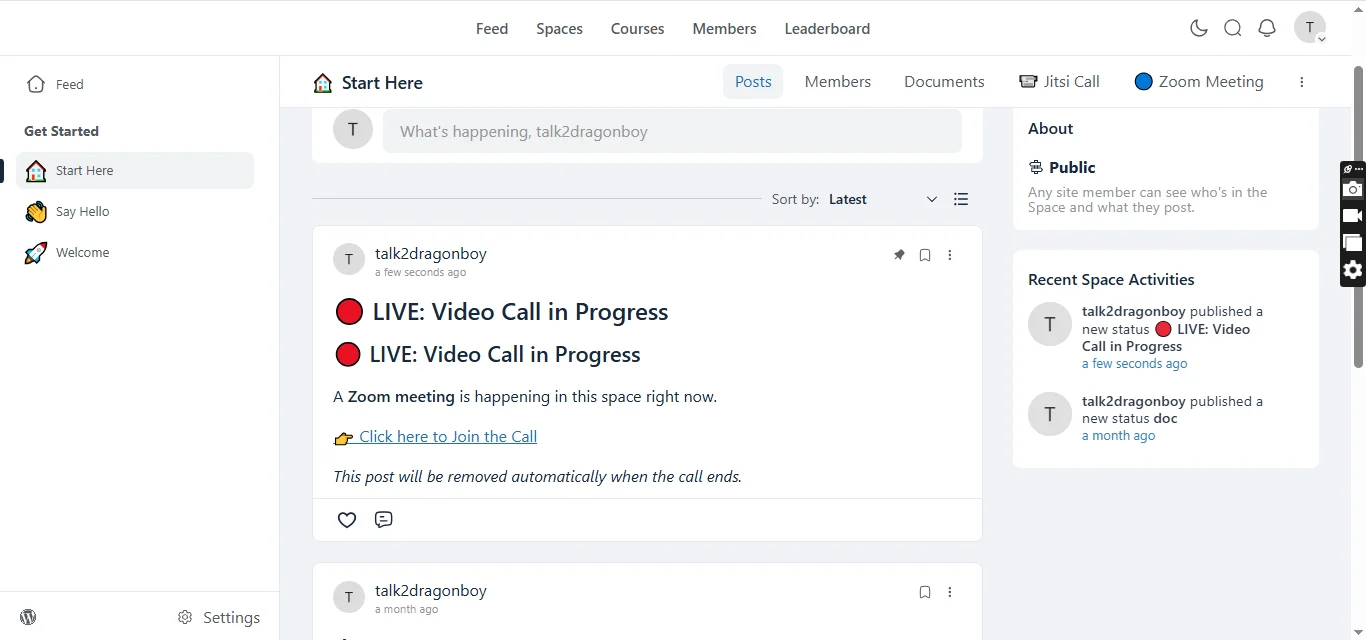
image 2:
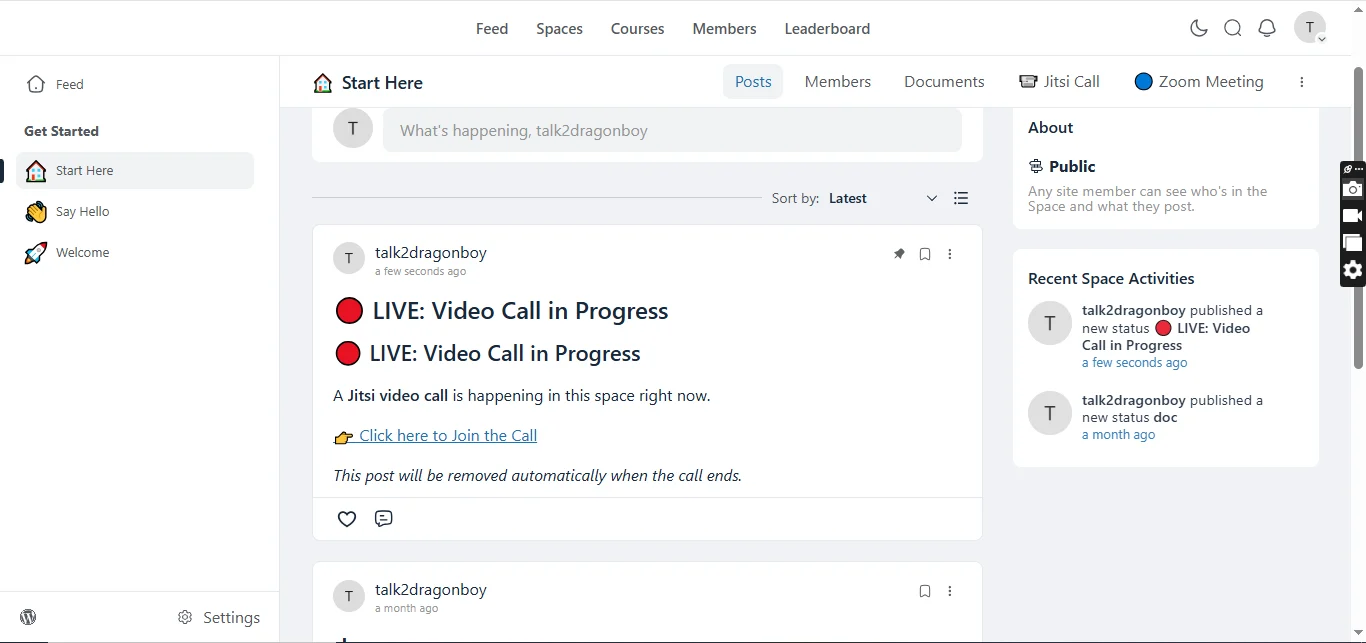
image 3:
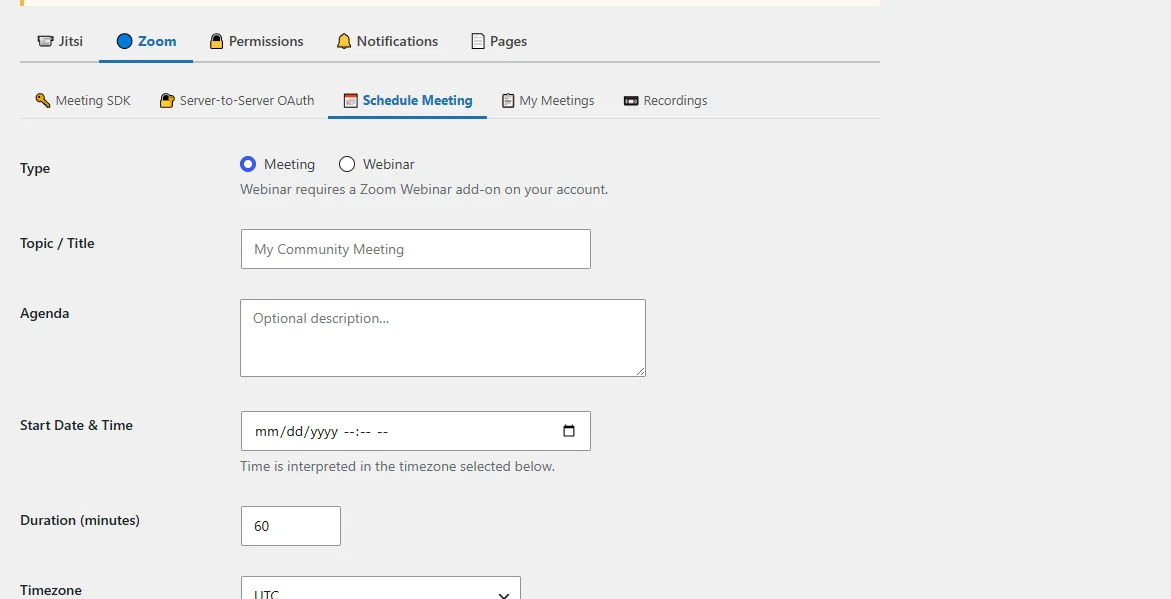
image 4:
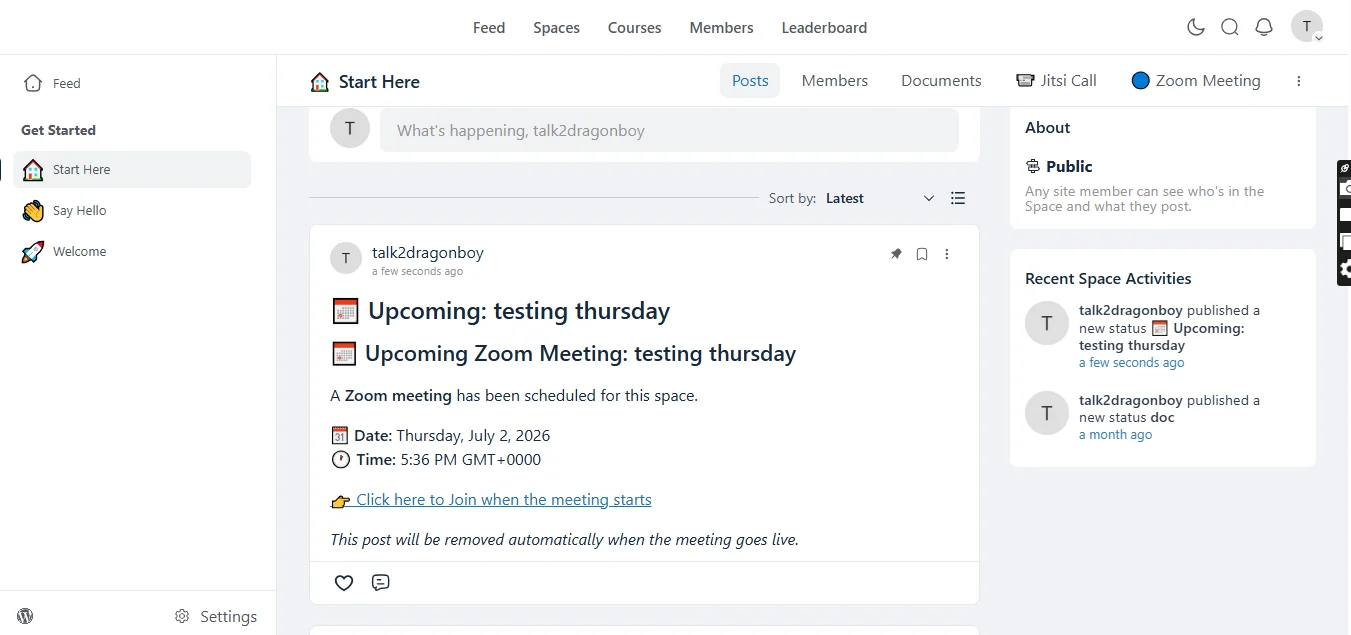
image 5:
Why Choose FluentCommunity Video Calls?
Unlike standalone video plugins, this plugin is built specifically around FluentCommunity.
It connects your community spaces with live communication tools, creating a complete social learning and collaboration environment.
Your members don't just join a website — they join a connected community.